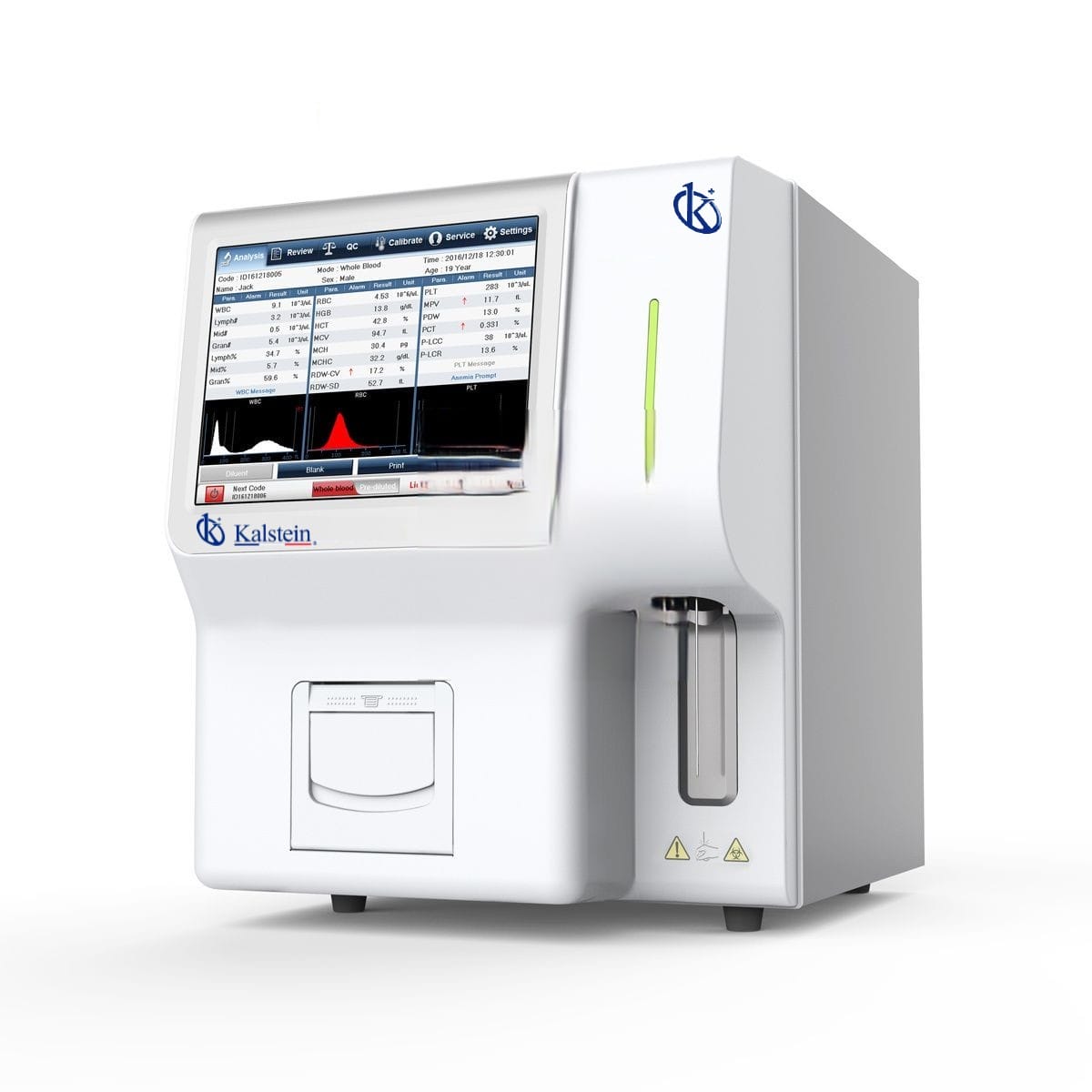
Installations- och driftsättningsguide för YR06170 Automatisk Veterinär Hematologi Analyzer
YR06170 Automatisk Veterinär Hematologi Analyzer är en sofistikerad enhet som är utformad för att underlätta noggrann och effektiv blodanalys i veterinärkliniker. Korrekt installation och driftsättning av denna utrustning är avgörande för att säkerställa optimal prestanda och livslängd. Denna guide kommer att vägleda dig genom de nödvändiga stegen för uppackning, installation och initial kalibrering av YR06170, samt ta upp vanliga fallgropar och bästa praxis.
Förstå YR06170: Nyckelfunktioner och specifikationer
| Modell | YR06170 |
|---|---|
| Kategori | Veterinäranalysator |
| Mätningsprinciper | Impedansmetod för cellräkning, kolorimetrisk metod utan cyanid för HGB-mätning |
| Mätningskanaler | Dubbla kanaler för räkning |
| Prestanda | Från teststart till utskrift: ≤60 sekunder |
| Räkningslägen | Helblod, förutspädd blod |
| Provvolym | Helblod: ≤14µL, Förutspädd blod: ≤20µL |
| Ström | 220V, 50Hz Ingångseffekt: ≤150VA |
| Mått | 368mm x 448mm x 475mm |
| Driftsmiljö | Omgivningstemperatur: 10℃~30℃, Relativ luftfuktighet: ≤70%, Atmosfärstryck: 70.0kPa~106.0kPa |
Uppackning och initial installation av YR06170
Innan installationen, se till att du har alla nödvändiga komponenter. YR06170-paketet innehåller:
- YR06170 Analyzer
- Strömkabel
- Bruksanvisning
- Kalibreringsprover
- Rengöringsmaterial
Efter uppackning, kontrollera om det finns några fysiska skador på enheten. Om några problem upptäcks, kontakta teknisk support innan du fortsätter.
Förankring och nivåjustering
Placera YR06170 på en stabil, plan yta för att minimera vibrationer och säkerställa noggranna avläsningar. Nivåjustering kan verifieras med ett vattenpass placerat ovanpå enheten. Justera fötterna på analysatorn efter behov för att uppnå en stabil hållning.
Strömförsörjning
Anslut strömkabeln till ett lämpligt uttag (220V, 50Hz). Se till att strömbrytaren på baksidan av enheten är påslagen. Enheten kommer att påbörja sin uppstart, vilket kan ta några ögonblick.
Första Kalibrering
Kalibrering är avgörande för att säkerställa korrekta resultat. Följ dessa steg för första körningen:
- Öppna kalibreringsmenyn via pekskärmen.
- Ange de specifika parametrarna för kalibreringsproverna som medföljer i paketet.
- Kör kalibreringstester enligt vad som anges av analysatorn.
En lyckad kalibrering kommer att indikeras på skärmen. Om kalibreringen misslyckas, kontrollera provkvaliteten och upprepa processen.
Vanliga Installationsmisstag och Hur man Undviker Dem
Att ställa in YR06170 kan vara enkelt om några vanliga misstag undviks:
- Felaktig Nivellering: Se alltid till att analysatorn är helt i nivå för att undvika felaktiga avläsningar.
- Felaktig Strömförsörjning: Använd endast den angivna spänningen för att förhindra skador.
- Att Inte Kalibrera: Att inte kalibrera kan leda till felaktiga resultat. Kalibrera alltid före första användning.
Platskrav för Optimal Drift
För att säkerställa bästa prestanda av YR06170 måste följande miljöförhållanden uppfyllas:
- Omgivningstemperatur: Håll ett intervall på 10℃ till 30℃.
- Relativ Luftfuktighet: Håll under 70% för att förhindra kondens.
- Atmosfäriskt Tryck: Arbeta inom 70.0kPa och 106.0kPa.
Här är en checklista för platsförberedelse:
| Platskrav | Specifikation |
|---|---|
| Temperatur | 10℃ till 30℃ |
| Fuktighet | ≤70% |
| Strömförsörjning | 220V, 50Hz |
Vanliga Frågor
Vilka är de viktigaste funktionerna hos YR06170 Automatisk Veterinär Hematologi Analysator?
YR06170 har ett användarvänligt gränssnitt med en 10.4-tums äkta färg LCD pekskärm, dubbelkanal för räkning och stödjer flera språk. Den är förinställd för 13 djurtyper och tillåter tillägg av 3 användardefinierade djur för att möta behoven hos de flesta veterinärkliniker.
Hur felsöker jag vanliga problem med YR06170?
Vanliga problem inkluderar att utrustningen inte slås på, felkoder som visas på skärmen och inkonsekventa avläsningar. För varje problem, kontrollera strömförsörjningen, säkerställ korrekt kalibrering och hänvisa till användarmanualen för specifika felkoder och rekommenderade lösningar.
Vad är kalibreringsprocessen för YR06170?
Kalibreringsprocessen innebär att man går in i kalibreringsmenyn på pekskärmen, matar in parametrarna för de tillhandahållna kalibreringsproverna och kör testerna enligt anvisningarna. Kalibrering måste utföras före användning för att säkerställa noggrannhet.
Vilka är de rekommenderade miljöförhållandena för att använda YR06170?
De rekommenderade miljöförhållandena inkluderar omgivningstemperaturer mellan 10℃ till 30℃, relativ luftfuktighet under 70% och atmosfärstryck som varierar mellan 70.0kPa och 106.0kPa.
Hur underhåller jag YR06170 för optimal prestanda?
Regelbunden underhåll inkluderar att rengöra enheten och säkerställa att den är kalibrerad enligt tillverkarens riktlinjer. Regelbundna kontroller för programuppdateringar och snabb uppmärksamhet på felkoder rekommenderas också för att upprätthålla hög prestanda.
Kan jag begära en offert för YR06170?
Ja, du kan begära en offert för YR06170 genom våra dedikerade kanaler, vilket säkerställer att du får det bästa priset som finns tillgängligt.
Om du letar efter en fusion av innovation och kvalitet har du kommit till rätt ställe. På Kalstein erbjuder vi dig lyxen att utforska vår exklusiva katalog av laboratorieutrustning. Vi tillverkar varje enhet enligt de högsta standarderna för excellens. Våra intuitiva och sömlösa onlineköpskanaler är utformade för din bekvämlighet, vilket säkerställer de mest konkurrenskraftiga priserna. Tveka inte längre — vi ger liv åt vetenskapen, det är dags att bli en del av vår gemenskap.